
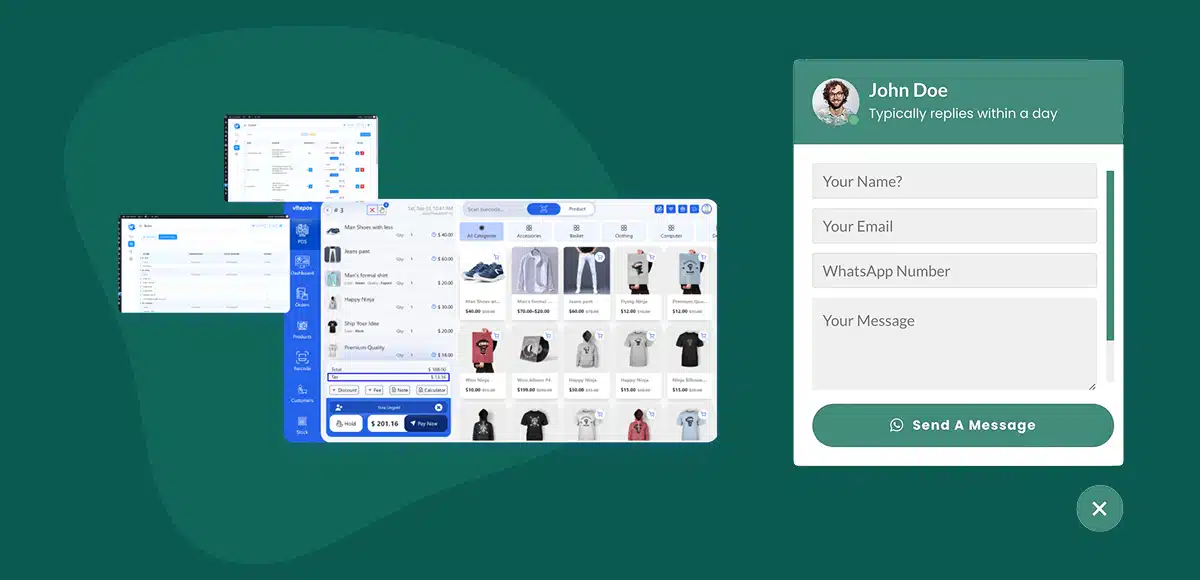
WhatsApp customer support WooCommerce POS is no longer optional—it’s the difference between a lost customer and a closed sale.
Today’s customers expect instant replies. They don’t wait for emails, and they won’t chase support tickets. Whether they’re standing at your counter or browsing your store online, they want answers now—and they want them on WhatsApp.
And here’s the shift most businesses are still catching up to: your POS is no longer just a billing tool. It’s a communication hub. A place where conversations happen, trust is built, and buying decisions are made in real time.
That’s where WhatsApp changes the game.
In this guide, you’ll learn how to add WhatsApp customer support WooCommerce POS using Vitepos—step by step—so you can respond faster, connect better, and turn everyday interactions into revenue.
What is WhatsApp Customer Support WooCommerce POS?
At its core, WhatsApp customer support WooCommerce POS is about turning your point-of-sale system into a real-time communication channel.
Let’s break that down.
A WooCommerce POS (like Vitepos) isn’t just for processing payments anymore. It’s used by retail stores, restaurants, and hybrid businesses—places where online and in-person sales blend together. Customers might discover a product online, ask questions in-store, and complete the purchase later. The journey is fluid.
Now layer WhatsApp into that experience.
Instead of slow, back-and-forth emails or missed calls, customers can simply tap a button and start a conversation instantly. No friction. No waiting.
Here’s what that looks like in real life:
- A customer asks about an order status directly from your store page
- Someone wants to confirm product availability before visiting your shop
- A buyer needs quick clarification before completing checkout
- You send instant order confirmations or follow-ups after purchase
It’s fast. It’s familiar. And it meets customers where they already are—on WhatsApp.
In simple terms, WhatsApp customer support WooCommerce POS connects your sales system with real-time messaging, making every interaction smoother, faster, and far more human.
Why WhatsApp Customer Support WooCommerce POS Matters
Let’s be real—speed wins.
WhatsApp customer support WooCommerce POS isn’t just a nice add-on. It’s how modern businesses keep up with how people actually buy today: fast, mobile, and conversational.
Here’s why it matters:
- Instant Communication: Customers don’t wait for email anymore. If they have a question, they want an answer now—not in 6 hours. WhatsApp delivers that immediacy. One tap. One message. Done.
- Higher Conversion Rates: Every unanswered question is a lost sale. A quick reply at the right moment can turn hesitation into action. No delays. No second thoughts. Just purchase.
- Customer Trust: WhatsApp feels personal. Direct. Human. It’s not a support ticket—it’s a conversation. And conversations build trust faster than any checkout page ever could.
- Reduced Cart Abandonment: Most customers don’t leave because they’re not interested. They leave because they’re unsure. Answer the question, remove the doubt—and the sale stays.
- Mobile-First Behavior: Your customers live on their phones. And most of that time? It’s on WhatsApp. Meet them there—or risk being ignored elsewhere.
WhatsApp customer support WooCommerce POS isn’t about support—it’s about removing friction at the exact moment it costs you money.
What is Vitepos and How It Works
If WooCommerce is your store’s backbone, Vitepos is what turns it into a real-world selling machine.
Vitepos is a modern Point of Sale (POS) plugin built specifically for WooCommerce, designed to help businesses run both online and physical sales from one unified system. You can explore its full feature set on the official Vitepos website.
Whether you’re running a retail shop, a restaurant, or a hybrid business that sells both online and offline, Vitepos brings everything into one place—products, customers, orders, and payments.
Here’s how it works in practice:
- You load your WooCommerce store into a POS interface
- You process orders quickly at the counter
- Everything syncs automatically with your online store in real time
- Inventory, customers, and sales stay updated across both channels
It’s not a separate system—it’s an extension of WooCommerce itself.
Key Features That Make Vitepos Powerful
- Fast Checkout Experience – Built as a modern, single-page application, Vitepos processes actions instantly—no lag, no clutter.
- Real-Time Sync – Sales, inventory, and orders update automatically between your POS and online store. No manual work.
- Offline Support – Even if your internet drops, Vitepos continues working and syncs data later—keeping your business running without interruption.
- Full Store Management – Manage outlets, customers, invoices, roles, and even barcode scanning—all from one system.
But here’s the bigger picture.
Vitepos is built for speed and operations—it helps you sell faster, manage better, and stay organized.
What it doesn’t do by default… is handle real-time customer conversations.
And that’s where WhatsApp comes in.
👉 Now let’s connect Vitepos with WhatsApp and turn your POS into a full communication engine.
Benefits of Adding WhatsApp to Vitepos
This is where things shift—from running a store to running a smarter business.
Adding WhatsApp to Vitepos isn’t about adding another tool. It’s about removing friction at every stage of the customer journey.
Here’s what that unlocks:
- Real-Time Customer Interaction at POS – The moment a customer hesitates, you’re there. Questions don’t get lost. Opportunities don’t slip away. It’s instant, human, and right when it matters most.
- Send Order Confirmations via WhatsApp – No more “Did my order go through?” With WhatsApp, confirmations feel immediate and personal—right in the customer’s pocket. Clear. Reassuring. Professional.
- Handle Customer Queries Instantly – Every question is a decision point. Answer fast, and you move the sale forward. Delay, and you risk losing it entirely. WhatsApp keeps the conversation flowing.
- Improve Repeat Purchases – People come back to businesses that respond. A quick follow-up. A helpful reply. A smooth experience. That’s how one-time buyers turn into loyal customers.
- Support Before & After the Sale – Support doesn’t stop at checkout—and neither should you. From pre-sale questions to post-sale assistance, WhatsApp keeps the relationship alive long after the transaction ends.
Vitepos helps you sell faster. WhatsApp helps you sell smarter.
How to Add WhatsApp Customer Support WooCommerce POS (Step-by-Step)
This is where everything comes together. Setting up WhatsApp customer support WooCommerce POS is surprisingly simple—no coding, no complex integrations. Just a few smart steps, and your store goes from static to conversational.
Let’s walk through it.
Step 1 – Install a WhatsApp Chat Plugin
Start by installing a reliable WhatsApp plugin—and Chat Help is built exactly for this use case. You can download the free version directly from the WordPress plugin repository.
It’s lightweight, flexible, and designed to work seamlessly with WooCommerce environments like Vitepos.
Here’s why it works so well:
- Easy Setup – Install → Activate → Configure. That’s it.
- WooCommerce Compatible – Works across product pages, checkout, and customer interactions tied to your POS flow.
- Dynamic Messaging Support – Automatically include product details, page info, and custom inputs in messages.
Once installed, you’re ready to connect your WhatsApp.

Step 2 – Configure WhatsApp Number
Now, connect your WhatsApp account.
Inside the plugin settings:
- Enter your WhatsApp number (with country code)
- Choose between WhatsApp or WhatsApp Business
- Set a default message that users will send when they click
Keep it simple but intentional. Example:
“Hi, I have a question about your product.”
This is your entry point—make it frictionless.
Step 3 – Customize Chat Layout
This is where you shape the experience.
Chat Help gives you multiple layout options:
- Floating Chat Button (most popular)
- Form Chat (collect name + message first)
- Pre-Chat Message (guide the user before interaction)
Then refine it:
- Match your brand colors
- Adjust positioning
- Write a clear CTA (e.g., “Chat with us on WhatsApp”)
This isn’t just UI—it’s your first impression.

Step 4 – Add Dynamic Message (VERY IMPORTANT)
This is where your setup becomes powerful.
Instead of generic messages, you can send context-aware messages automatically.
Using Chat Help variables, you can include:
- Product Name → {productName}
- Product Price → {productPrice}
- Page URL → {currentURL}
- Page Title → {currentTitle}
Example message:
Hi, I’m interested in {productName}. Can you confirm availability?
Now every message is:
- Relevant
- Personalized
- Actionable
This dramatically improves response quality and conversion rate.
Step 5 – Enable on WooCommerce Pages
Next, decide where WhatsApp appears.
You should enable it on high-intent pages:
- Product Pages → Answer pre-purchase questions
- Cart Page → Reduce hesitation
- Checkout Page → Save abandoned orders
- POS-related flows → Support in-store + hybrid interactions
The closer to the buying decision, the more impact it has.
Step 6 – Test the Integration
Before going live, test everything.
- Click the WhatsApp button
- Confirm it opens correctly
- Check if the message is formatted properly
- Test on mobile devices (this is critical)
You want zero friction.
If it takes even one extra second or feels confusing—you lose conversions.
Once this is set up, your WhatsApp customer support WooCommerce POS is fully live.
And now?
You’re not just processing orders—you’re having conversations that drive them.
Best Plugin for WhatsApp Customer Support WooCommerce POS
When it comes to setting up WhatsApp customer support WooCommerce POS, the tool you choose matters. You want something flexible enough to adapt to your store—but simple enough to set up in minutes.
That’s where Chat Help stands out.
It’s not just another chat button plugin. It’s built to turn WhatsApp into a smart communication layer across your WooCommerce store and POS experience.
Here’s what makes it a strong choice:
Multi-Layout Support
Not every store communicates the same way—and Chat Help gets that.
You can choose from:
- Floating chat button
- Form-based chat
- Pre-chat message
- Single or multi-agent setups
Whether you want something minimal or more interactive, you’re covered.
WooCommerce Variables Integration
This is where things get powerful.
Chat Help lets you include real-time WooCommerce data directly in messages, like:
- Product name
- Price
- Page details
So instead of generic chats, you get context-aware conversations that actually move sales forward.
Pre-Filled Smart Messages
You’re not starting from scratch every time.
Messages can be pre-filled with:
- Customer input
- Product details
- Page context
That means less typing for users—and faster, clearer communication for you.
Easy Customization
No coding. No complexity.
You can quickly adjust:
- Colors and branding
- Button position
- Call-to-action text
Everything is designed to fit your store without friction.
🆓 Free vs Pro (Quick Note)
The free version is more than enough to get started and launch your WhatsApp customer support WooCommerce POS setup.
If you want advanced layouts, multi-agent features, or deeper customization, the Pro version unlocks more flexibility—but it’s entirely optional.

Real-World Use Cases
This is where WhatsApp customer support WooCommerce POS stops being a feature—and starts becoming part of how your business actually runs.
Let’s make it real.
Retail Store
A customer is browsing your product page late at night. They like what they see—but they’re unsure about availability or size.
Instead of leaving, they tap the WhatsApp button.
“Hi, is this available in medium?”
You reply instantly.
They get clarity.
They complete the purchase.
No delays. No drop-off. Just a smooth decision.
Restaurant POS
A customer places an order but wants to double-check something—ingredients, timing, or customization.
Instead of calling (and waiting), they message you:
“Can I make this order without onions?”
You confirm in seconds.
They feel heard.
The order stays intact.
Fast communication keeps the experience seamless.
Service Business
A customer is interested—but not fully convinced. They have questions about pricing, availability, or booking.
They click WhatsApp:
“Hi, do you offer this service on weekends?”
You respond quickly, maybe even guide them to book.
That one conversation turns curiosity into commitment.
The pattern is simple:
👉 Question → Instant reply → Confident customer → Completed action
That’s the real power of WhatsApp customer support WooCommerce POS—meeting customers at the exact moment they need you, and giving them a reason to move forward.
Tips to Optimize WhatsApp Customer Support
Setting up WhatsApp customer support WooCommerce POS is just the beginning.
What really drives results is how you use it.
These small optimizations? They make a big difference.
Use Quick Replies
Not every message needs a custom response.
Create shortcuts for common questions like:
- “Is this available?”
- “What are your delivery times?”
- “Do you offer discounts?”
Quick replies save time—and keep your responses consistent and professional.
Set Working Hours
Availability matters.
Let customers know when you’re online—and when you’re not.
This avoids frustration and sets clear expectations.
Better to say “We’ll reply at 9 AM” than leave someone waiting in silence.
Use WhatsApp Business Auto-Replies
You don’t have to be online 24/7 to feel responsive.
Set up:
- Greeting messages
- Away messages
- Instant replies
Even when you’re offline, the conversation doesn’t feel dead.
Keep Response Time Low
Speed is everything.
A reply within minutes feels natural.
A reply after hours feels forgotten.
The faster you respond, the higher your chances of closing the sale.
Personalize Your Messages
No one likes robotic replies.
Use the customer’s name.
Reference the product they’re asking about.
Keep it human.
“Hi John, yes—the {productName} is available and ready to ship.”
That one small touch builds trust instantly.
Tools get you started—but experience is what keeps customers coming back.
And when done right, WhatsApp customer support WooCommerce POS doesn’t just support your business—it strengthens every interaction.
Common Mistakes to Avoid
Setting up WhatsApp customer support WooCommerce POS is easy.
Doing it right? That’s where most businesses slip.
Avoid these common mistakes—and you’ll stay ahead of the curve.
Slow Response Time
Speed isn’t a bonus—it’s the whole game.
If a customer messages you and waits… they move on.
Simple as that.
👉 Fast replies = more sales
👉 Delays = lost opportunities
Generic Replies
“Hello, how can we help you?” isn’t enough anymore.
Customers expect relevance. Context. Personality.
If your replies feel copy-pasted, you lose trust instantly.
👉 Speak like a human, not a script.
No Clear CTA in Chat
A conversation without direction goes nowhere.
After answering a question, guide the customer:
- “Would you like to place the order now?”
- “I can help you complete checkout.”
👉 Always move the conversation forward.
Not Testing on Mobile
Most WhatsApp interactions happen on mobile.
If your button is misplaced, slow, or confusing—you lose users before the conversation even starts.
👉 Test on real devices. Not just desktop.
Overcomplicating the Setup
More features ≠ better experience.
Too many fields, too many steps, too much friction—customers drop off.
👉 Keep it simple. Clean. Fast.
The biggest mistakes aren’t technical—they’re experiential.
Fix those, and your WhatsApp customer support WooCommerce POS setup becomes a true growth engine—not just another tool.
FAQ
To add WhatsApp customer support WooCommerce POS, install a WhatsApp chat plugin like Chat Help, connect your WhatsApp number, customize the chat layout, and enable it on key WooCommerce pages like product, cart, and checkout. Once set up, customers can instantly message you directly from your store or POS flow.
Yes, you can easily use WhatsApp with Vitepos.
While Vitepos handles sales and order processing, WhatsApp adds a real-time communication layer. By integrating a plugin like Chat Help, you allow customers to ask questions, confirm orders, and get support instantly—before and after purchase.
One of the best plugins for WhatsApp in WooCommerce is Chat Help.
It offers flexible chat layouts, supports WooCommerce dynamic variables, allows pre-filled messages, and is easy to customize—making it ideal for adding WhatsApp customer support without complexity.
Yes—WhatsApp is extremely effective for POS businesses.
It enables instant communication, reduces customer hesitation, improves trust, and helps close sales faster. With WhatsApp customer support WooCommerce POS, businesses can respond in real time and create a smoother, more engaging buying experience.
Final Thoughts
The way customers communicate has changed—and there’s no going back.
WhatsApp isn’t just another channel anymore. It’s an expectation.
Fast, direct, and always within reach.
The good news? Setting up WhatsApp customer support WooCommerce POS is simple.
No complex systems. No heavy development. Just a few smart steps—and you’re live.
But the impact? That’s where it gets serious.
- Faster responses
- Stronger customer trust
- Fewer abandoned carts
- More completed sales
It’s not just support—it’s a competitive edge.
If you’re already using Vitepos, you’re halfway there.
Now it’s time to close the loop with real-time communication.
Start adding WhatsApp to your WooCommerce POS today—and turn every interaction into an opportunity.
Subscribe
To get news about new releases, Updates, Blog Post, Deals and Discounts

