Vitepos
< 1 min read
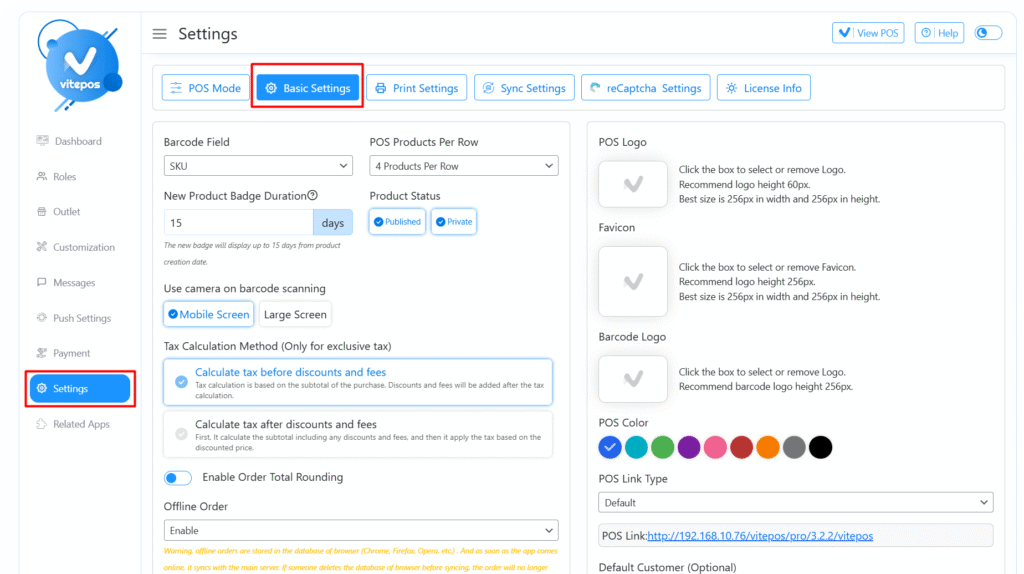
To set up your tax preferences, first navigate to the Vitepos Admin Panel.
Go to the Basic Settings tab under the settings menu.
In this section, you will find the Tax Calculation Method.
Tax is calculated based on the subtotal of the cart. Discounts and fees are applied after the tax is calculated.
Discounts and fees are applied first, reducing the subtotal. Tax is then calculated on the discounted price.
Choose the method that best fits your pricing and accounting strategy, then save your settings.
After setting the tax method, navigate to the Vitepos POS Panel.
Add products to the cart and complete an order.
On the order invoice, you will see the tax calculated and displayed according to your selected method.
Watch the full tutorial on tax calculation methods:
Powered by BetterDocs