View Categories

Restaurant Pay First Mode Setup

< 1 min read

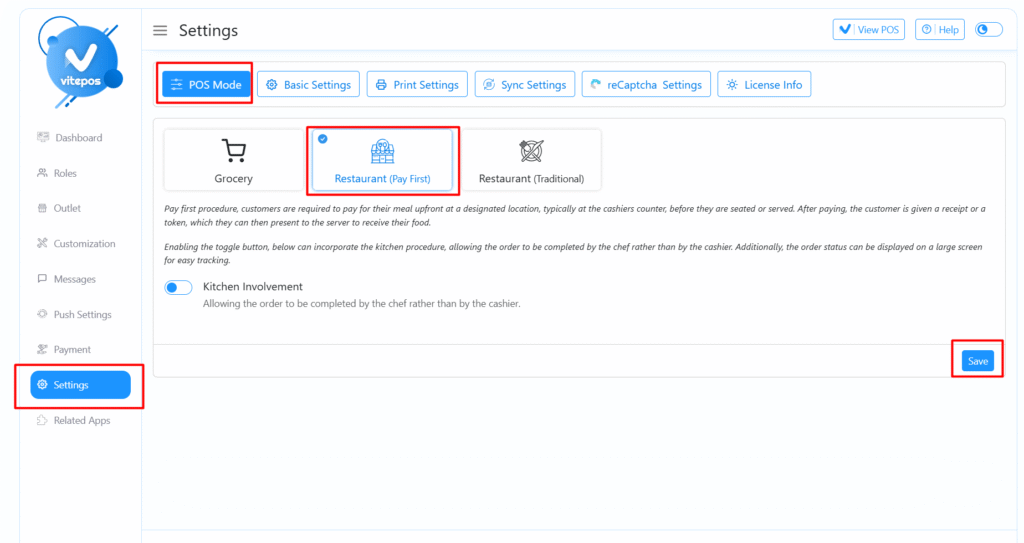
Admin Panel – Enable Restaurant Pay First Mode #

To set up Restaurant Pay First Mode, start by navigating to the Vitepos Admin Panel.

Select the “Pay First” mode under the restaurant mode settings.

Save the changes to activate this order flow.

POS Panel – Place an Order #

Next, go to the POS Panel, select a few items, and complete the order. The system will follow the pay-first logic, meaning payment is made before order processing begins.

Restaurant Pay First Mode

Admin Panel – Enable Kitchen Environment #

Return to the Admin Panel and enable the Kitchen Environment option under restaurant settings. Save the configuration to activate the kitchen workflow.
Restaurant Pay First Mode

POS Panel – Order with Kitchen Status #

Now when you place an order from the POS, the invoice will display the Kitchen Status, showing the integration with the kitchen process.

Kitchen Module – View Orders #

Navigate to the Kitchen Module. Here, you will see the orders placed from the POS system, ready for preparation.

Video Tutorial of Restaurant Pay First Mode #

Watch the full Vitepos Restaurant Pay First Mode guide:

Powered by BetterDocs

Scroll to Top
