View Categories

Import Role from WordPress

< 1 min read

How to Import Role from WordPress #

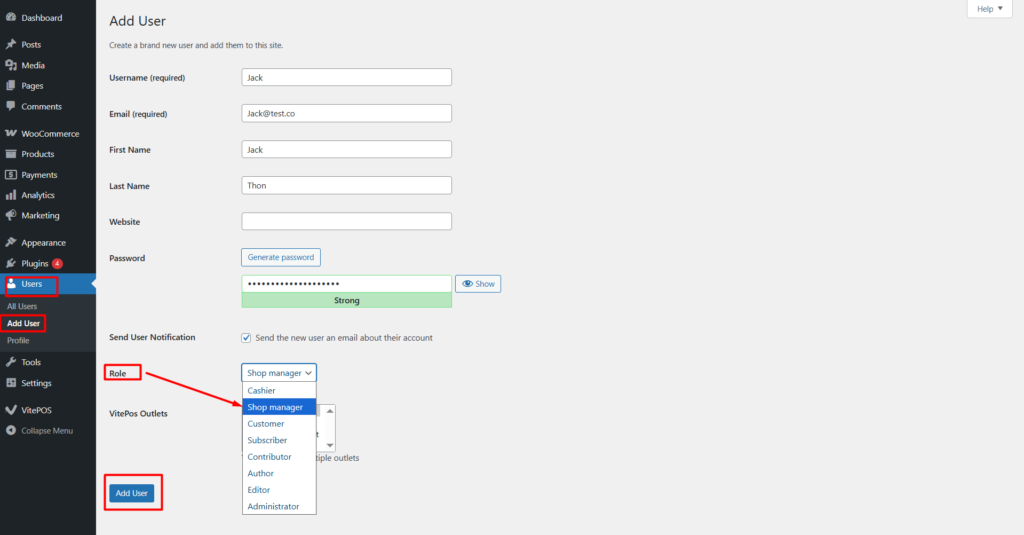
Create a Role in WordPress #

  1. Navigate to the WordPress Admin Panel
  2. Go to Users→ Add New
  3. Create a new user and assign the Shop Manager role
  4. Save the user
Import Role from WordPress

Import Role into Vitepos #

1. Navigate to the Vitepos Admin Panel
2. Open the Role Module
3. Click on the Import Role from WordPress button

Select and Add the Role

  1. After clicking the import button, you will see a list of all available WordPress roles
  2. Select your desired role
  3. Add the user from WordPress to Vitepos
Import Role from WordPress

Video Guide #

For a detailed step-by-step walkthrough, please watch the Vitepos Import Role from WordPress video tutorial.

Powered by BetterDocs
Scroll to Top
